The callback is where sloppy time tracking gets expensive
Every shop owner knows this feeling. A tech says the condenser was cleaned, the contactor was replaced, and the system was left running. Then the customer calls back because the house is still warm, or the unit is short cycling again, or the same noise is back.
Now you’re stuck sorting out memory, phone notes, and a paper timesheet that says 8:00 to 11:30. That doesn’t tell you much. It doesn’t tell you who checked suction pressure, who took the photo of the coil, or whether anyone actually waited long enough to see the system pull down.
That’s why field time tracking in HVAC has to do more than count hours. It has to tie the time to the work.
If the truck was on site from 9:12 to 10:26, say it. If the tech checked return air temp, outdoor ambient, suction pressure, head pressure, and capacitor ratings, record that too. If the coil was cleaned, the after photo should show the fins and the pan. If the customer walked the tech through a basement leak, the note should say so. That’s the record that stands up when the job gets questioned.
What I want to know after a service call
I don’t need a fancy report. I need the same few facts on every HVAC visit.
Who checked in. Not the crew name. The actual tech.
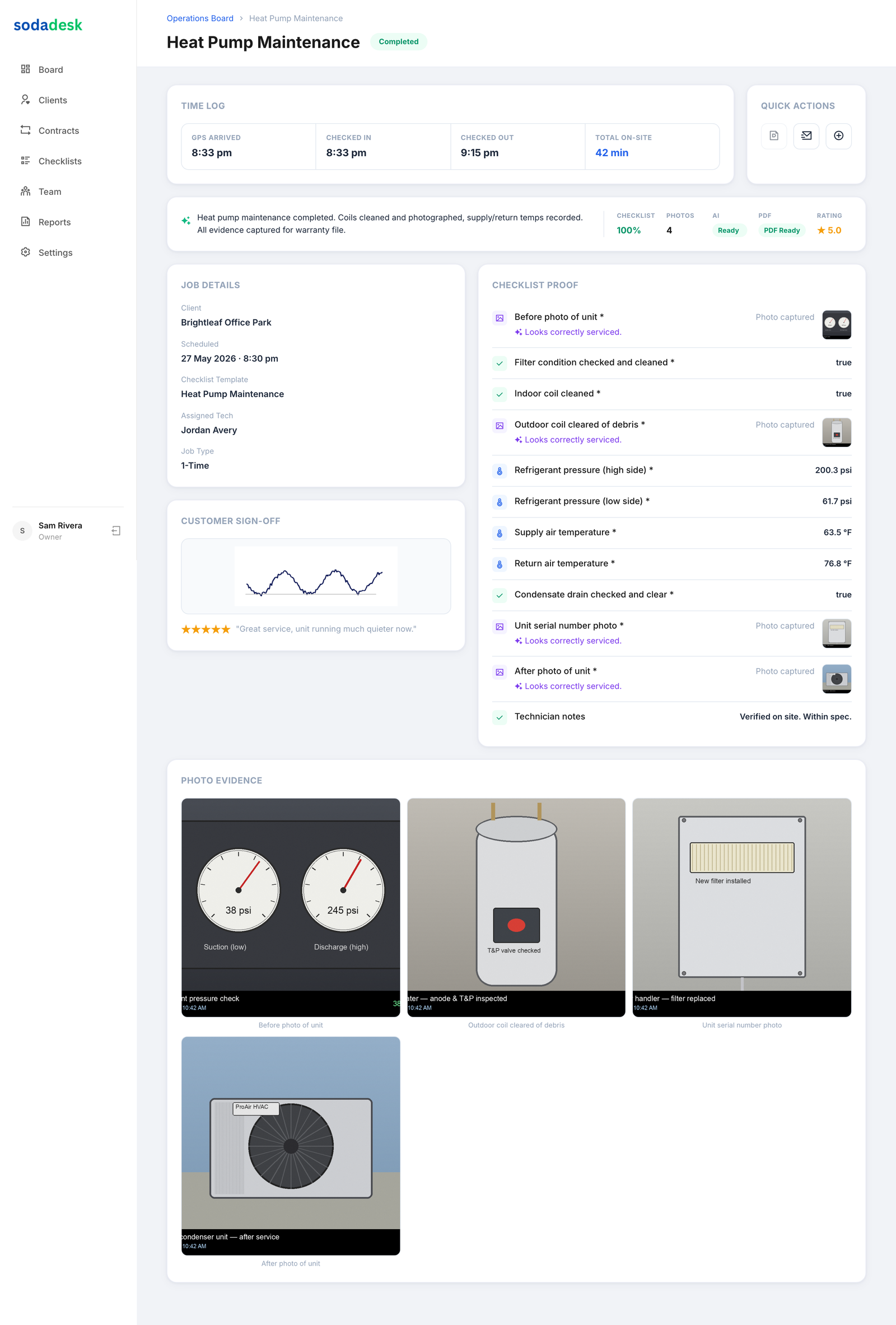
When they got there and when they left. GPS check in gives you the arrival stamp. Time on site shows whether the job took 20 minutes or two hours.
What equipment they touched. Unit model, serial, and location matter. Upstairs attic unit is not the same as the basement air handler.
What readings they took. I want suction pressure, discharge pressure, line temp, return temp, supply temp, static pressure if they checked it, and any capacitor or voltage reading that explains the fix.
What they did. Replaced the contactor. Tightened a loose fan wire. Cleared the drain line. Washed the condenser coil. Reset the thermostat and watched the cycle.
What proof they left behind. Before and after photos, a checklist, and a customer signature if the call calls for it.
That’s not busywork. That’s the difference between a clean record and a messy argument later.
Why paper timesheets fail in the field
Paper looks cheap until you try to use it.
A tech fills out the sheet in the truck at 7:15 that night. Maybe they remember the exact arrival time. Maybe they don’t. Maybe they write “replace bad part” and call it good. Maybe the sheet gets wet, crumpled, or left on the dash under a stack of service tickets.
And if you’re trying to track HVAC timesheets across five, ten, or twenty trucks, paper turns into a pile of guesses.
I’ve seen the usual problems.
The start time is rounded because nobody wrote it down until lunch.
Two techs worked the same rooftop unit, but only one name ended up on the card.
The checklist says “system tested,” but nobody noted the supply temp after the repair.
The after photo is missing, so now you’re asking the tech to remember if the coil was actually cleaned or just blown out a little.
That’s bad for you, and it’s bad for the honest tech too. The guy who did the work right shouldn’t have to defend it because somebody else was careless with the record.
The record that saves you when a customer calls back
Say a tech replaces a failed dual run capacitor on a 4 ton split system. He records the old part reading, the new capacitor rating, and the discharge temp after the unit runs for 15 minutes. He snaps a photo of the old swollen capacitor and the new part installed. He checks off that the panel was secured, the disconnect was reinstalled, and the thermostat was verified.
Two days later, the customer says the AC is still acting up.
Now you’ve got something useful. You can see who was there, what time they showed up, how long they stayed, and what the system readings looked like after the repair. If the notes show the suction pressure was still low and the coil was iced, then the issue wasn’t a bad capacitor. If the record shows the condenser fan motor was drawing too much amperage, that points somewhere else.
That kind of record doesn’t solve every dispute. But it stops the dumb ones.
And it keeps you from eating the cost of a callback just because nobody wrote down the facts.
What a good HVAC field time clock app should capture
A field crew time clock app should do more than punch the clock. It should tie the person, the place, and the proof together.
For HVAC work, I want these pieces on every visit.
GPS check in at the job site. Not in the parking lot down the block. At the address.
Tech name and timestamp. If two people were on the call, I want both names.
Time on site. Arrival and departure matter more than a fuzzy end-of-day summary.
A visit checklist. Filter changed, drain cleared, contactor checked, airflow verified, panels reinstalled, thermostat tested.
Photo proof. Dirty coil, clean coil, cracked drain pan, new part, finished panel, whatever tells the story.
Job notes with real numbers. Temperatures, pressures, voltage, amperage, capacitor microfarads, flame rollout observations if it’s a gas furnace, and anything else that explains what happened.
Customer signoff when the visit ends. Not because the signature fixes everything, but because it shows the customer saw the work before the truck pulled away.
That’s the stuff that makes an HVAC timesheets app worth using. If it only tells you that somebody clocked eight hours, it’s missing the point.
Recurring service visits need the same proof every time
A lot of HVAC money is made on repeat visits. Spring tune-ups, fall heating checks, filter changes, drain cleanouts, and maintenance on rooftop units. Those visits look routine until one gets skipped or done halfway.
Recurring service work is where a shop can get lazy. The tech sees the same building every season and starts moving fast. That’s when proof matters most.
If the checklist says clean the condenser coil, inspect the contactor, test the capacitor, measure supply and return air temp, and verify the blower compartment is clear, then I want those items checked off every time. Not just “maintenance completed.”
And I want the visit tied to the actual person who did it. If one technician handled the filter change and another handled the mechanical checks, the record should show that. That matters when a customer asks why a drain issue was found on one visit but not the last one.
For recurring work, the record should show:
The date and arrival time
Which tech handled the visit
Which unit was serviced
What readings were taken
What parts were replaced, if any
Photos of the before and after condition
That is the kind of trail you want sitting behind the truck.
Don’t confuse activity with accountability
A lot of software will tell you a tech was “active.” Fine. That doesn’t tell you whether the work got done right.
I care less about motion and more about proof.
Did the tech get to the site on time. Did they stay long enough to actually test the system. Did they leave a photo of the repair. Did they record the readings that explain the diagnosis. Did they note the second trip because the first part failed in the field.
That’s accountability. Not a dot on a map by itself. Not a clock-in time by itself. The full record.
If you’re comparing HVAC technician software, that should be the test. Can you see who was where, when they were there, what they did, and what they left behind for the next person who has to answer the customer’s call. If the answer is no, you’re still guessing.
A simple standard for your shop
Set one rule and stick to it. Every service visit gets a check in, a check out, a checklist, at least one photo, and the key readings that explain the work.
For a straight cooling call, that might be suction pressure, head pressure, return temp, supply temp, capacitor reading, and a photo of the finished panel. For a duct issue, it might be static pressure, a picture of the crushed flex, and a note on the airflow restriction. For a maintenance visit, it might be filter size, coil condition, drain condition, and proof the condensate line was clear.
You don’t need pages of notes. You need the right notes.
And once the crew gets used to recording the work while they’re still standing in front of it, the callbacks get easier to sort out. So do the conversations with customers who want to know what they paid for.
Common questions
What should an HVAC tech record on every service call?
At minimum, record the check in time, check out time, the exact unit serviced, the readings taken, what was repaired or cleaned, and photos of the finished work. If two techs touched the job, record both names.
Why isn’t a paper timesheet enough for HVAC crews?
Because it only shows hours. It doesn’t show who was on site, what they did, or whether there’s proof of the repair. When a customer calls back, that missing detail turns into a headache.
What readings matter most on a cooling call?
Common ones are suction pressure, head pressure, return air temperature, supply air temperature, voltage, and capacitor readings. If the job involved airflow or drain issues, note those too.
How does GPS check in fit into HVAC field time tracking?
GPS check in stamps where the tech arrived. It ties the clock-in to the job site instead of a guess from later in the day.
Do recurring HVAC maintenance visits need photos too?
Yes. A before and after shot of the coil, drain, panel, or replaced part gives you proof the visit was actually done, not just logged.