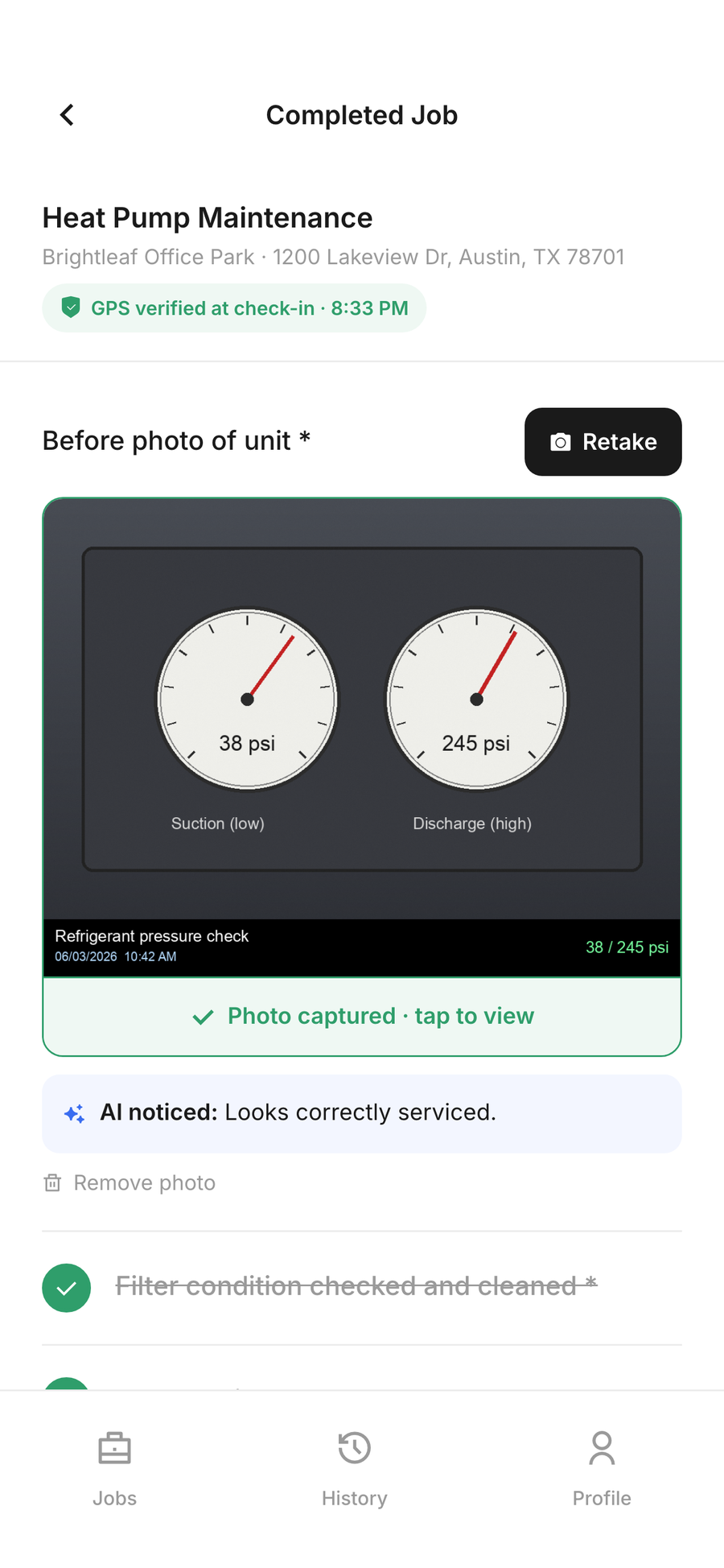
The problem starts when the work is done but the proof is thin
Most HVAC owners don’t get burned because the tech never showed up. They get burned because the record after the visit is weak. The customer says the filter was never changed. The office can’t say which tech was on site. The only note in the file says "unit checked." That doesn’t carry much weight when somebody is upset and staring at a warm house.
I’ve seen this on service calls more than once. Tech says he cleaned the flame sensor, checked static, and tested the capacitor. But all you’ve got is a handwritten note and a clock-in time that might as well be a guess. If the same unit calls back two days later, now you’re arguing about memory. Memory is cheap. Job proof is what matters.
A good proof packet fixes that. It shows the check in time, the time on site, the tech who did the work, the photos, the checklist, and the readings. Not a story. A record.
What a real HVAC proof packet should include
You don’t need a binder full of paper. You need the stuff that answers the question, "What happened here?"
For an HVAC maintenance or service visit, that usually means:
- GPS check in when the tech arrives
- Start and stop time on site
- Tech name tied to the visit
- Unit model and serial, if the tech is working on equipment with multiple pieces
- Photos of the equipment before and after
- Checklist items completed in the field
- Readings like supply air temperature, return air temperature, static pressure, superheat, subcooling, amperage, voltage, or capacitor microfarads
- Customer signature or acknowledgment when the job is done
That’s the meat of it. If the condenser was packed with cottonwood and the tech washed it out, show the before and after. If the blower wheel was dirty, show it. If the suction pressure looked odd, note it. If the contactor was pitted and replaced, record the part and the reason. The point is to leave behind enough detail that nobody has to guess later.
SodaDesk lives in that lane. It stamps the check in time, tracks time on site, and collects photo and checklist proof tied to the tech who did the work. That’s the kind of record a shop owner can use when a customer calls back annoyed and says the unit "never got serviced."
The difference between a note and evidence
A note says, "System checked."
Evidence says, "Checked 3 ton split system. Replaced 45/5 capacitor. Cleaned outdoor coil. Supply air 53 F, return air 74 F. Static pressure .82 in. wc. Before and after photos attached. Tech J. Morales on site 42 minutes. Customer signed at departure."
That’s a different animal.
And it matters because HVAC work gets messy in the real world. Maybe the tech gets called into an attic in August and the temperature is ugly. Maybe a condenser fan motor is running hot but not dead yet. Maybe the customer wants to know why the thermostat is set at 68 F and the upstairs still feels sticky. You don’t need a novel. You need the measurements and the proof that the tech actually took them.
If you’ve ever had a callback where the customer swore the drain line was never flushed, you know why photos matter. A quick shot of the trap, the pan, the cleaned drain line, and the algae slug sitting in the condensate pump tells the story fast. No arguing. Just the record.
The records that stop stupid callbacks
A lot of callback fights start small. Somebody says the filter wasn’t changed. Somebody else says the system was running fine when they left. Then the office gets dragged in to sort out who’s right.
This is where job proof earns its keep.
For routine maintenance, I’d want the tech to record:
- Filter size and condition
- Coil condition before cleaning
- Drain pan condition
- Blower compartment photo
- Capacitor reading if the unit is having hard starts
- Thermostat setting at arrival and departure
- Temperature split across the coil
- Refrigerant pressures or temperature measurements when the visit calls for it
- Any failed parts or abnormalities found
That isn’t overkill. That’s basic shop protection. If the tech took a reading and wrote it down, you’ve got something to stand on later. If he didn’t, you’re left with a shrug.
And when you run recurring service visits, this gets even more useful. The customer with a rooftop unit or a package unit wants the same thing every time. They want to know the equipment was looked at, not just waved at. A recurring visit record with the same checklist, the same photo points, and the same time tracking gives you a running history. That history matters when a unit starts acting up in the middle of cooling season.
Time on site matters more than most owners admit
I know some owners think time tracking is just for payroll. It isn’t. It’s part of the proof.
If a tech says he spent 18 minutes on a condenser clean and the job sheet shows 18 minutes on site, that lines up. If the note says a full coil clean, filter change, drain flush, capacitor test, and thermostat check happened in 9 minutes, you know something’s off. Maybe the tech was moving too fast. Maybe the record is sloppy. Either way, you’ve got a problem.
Time on site gives your documentation some backbone. It shows the visit had enough breathing room for the work that was claimed. It also helps when a customer says, "Nobody spent any time on this." You can point to the record and say the tech was checked in, on property, and working the unit for a real block of time.
SodaDesk tracks that in the field, so you aren’t piecing it together later from a half-remembered text thread or a coffee-stained paper sheet in the truck.
Photos should show the condition, not just the hero shot
A lot of techs know how to take a nice after photo. Clean coil. Bright equipment. Good angle. Fine.
But the photo that matters most is often the ugly one. The clogged coil. The oil stain at the flare. The water in the pan. The bent contactor. The burned wire at the blower relay. That’s what proves the tech saw the problem and worked it.
I’d push your crew to take pictures like they’re building a case file for the customer, not for Instagram. Before, during, after. If a part gets changed, capture the old part next to the new one. If the drain line was packed, show the clog. If the unit was short cycling because the capacitor was weak, document the reading before replacement.
This is where a lot of hvac inspection evidence app talk misses the mark. The point isn’t fancy. The point is to leave behind enough visual proof that nobody has to rely on somebody’s memory next week.
A simple rule for your techs
If a customer could reasonably ask, "How do I know that happened?" then your tech should record it.
That means:
- Show the condition before work starts
- Write down the reading, not just "tested good"
- Mark the checklist item complete in the field
- Attach the photo to the visit while it’s still fresh
- Capture the signature before the tech leaves the driveway
Keep it plain. No essay. No fluff. Just enough detail that the visit stands on its own.
This is especially useful on maintenance routes. A tech does the spring tune-up on the same RTU every year. The photo history shows the coil got dirtier over time. The checklist shows the same points were covered each visit. The time on site tells you the work wasn’t rushed. When the customer asks why a part failed later, you’ve got a record instead of a guess.
The shop owner’s payoff is fewer arguments
Good documentation doesn’t make the job glamorous. It makes the office quieter.
You spend less time chasing techs for what happened at the property. You spend less time defending work that was actually done. And when a customer questions a visit, you’ve got a clean packet with the facts. Who was there. When they got there. What they checked. What they found. What got photographed. What the customer signed.
That’s the whole game. Not fancy. Just solid.
If you’re running 5 trucks or 20, this is the kind of record that keeps a service shop from turning into a he said, she said operation. You want the visit to leave behind proof, not a memory.
Common questions
What should an HVAC service record include?
At minimum, I’d want the check in time, time on site, tech name, photos, checklist items completed, readings taken in the field, and a customer signature. If a part was replaced, record the part and show the old one if you can.
Why do photos matter on a maintenance visit?
Because photos show condition. A clean note saying "coil cleaned" doesn’t tell much. A before and after shot of a dirty coil, a plugged drain, or a burnt contactor gives the customer a real record of what the tech found and fixed.
What readings should a tech record on HVAC work?
That depends on the job, but common ones are supply and return air temperature, static pressure, capacitor microfarads, voltage, amperage, superheat, and subcooling. The point is to write down what was actually checked, not just say it was looked at.
How does job documentation reduce callbacks?
It doesn’t stop every callback, but it cuts down on the fake ones and the confused ones. If the visit has photos, readings, and a completed checklist, you can see what was done and whether the issue was already there or showed up later.