Start with the complaint, then open the record
A compressor job usually starts with a simple story from the customer. Warm air. Breaker tripping. Loud start and then nothing. Maybe the outdoor unit is humming but not running, or the compressor is short cycling on a hot afternoon.
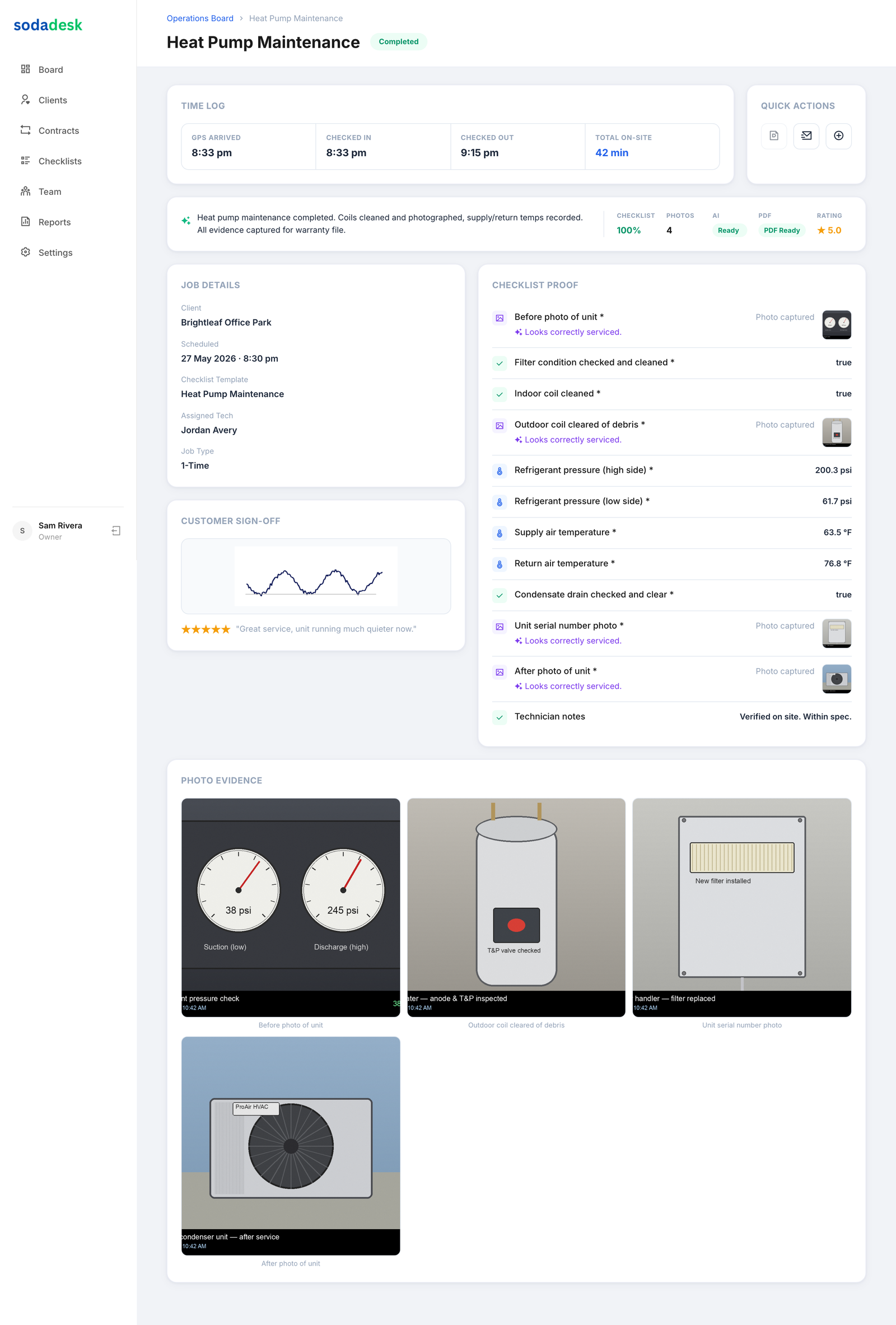
Before anybody grabs a gauge set, the tech should open the job record and start the clock. Time on site matters. If the truck is there for 18 minutes and the note says the compressor was checked, that’s not much of a record. If the tech spent an hour tracing a weak start circuit, checking the contactor, and pulling amp readings, you want that in the record.
SodaDesk stamps the check in time and ties the work to the tech who actually did it. That matters when you have more than one truck and more than one person talking about the same compressor later.
A good compressor record starts with basic facts:
- unit location
- model and serial number
- symptom the customer reported
- ambient temperature
- indoor return temp and supply temp
- outdoor ambient temp
- who was on site
That sounds simple. It is. But simple details keep the story straight.
Check the easy stuff before you blame the compressor
A lot of compressors get blamed before the rest of the circuit is even looked at. I’ve seen techs jump straight to a bad compressor when the real issue was a pitted contactor, a swollen start capacitor, a weak run capacitor, or a loose spade connector.
Have the tech record what they checked in order. Not a vague note like “checked unit.” I mean the actual items.
- line voltage at the disconnect
- line voltage at the contactor
- load side voltage
- contactor condition
- capacitor rating and actual reading
- compressor amp draw
- fan motor amp draw if it shares the complaint
- pressure readings, if the system will run long enough
- obvious signs of oil stain, burnt terminals, or a seized shell
If the compressor is not starting, note whether it’s locked rotor, open, grounded, or just not getting the right start assist. If the tech uses a hard start kit for testing, that should be in the record too.
And yes, take a photo of the swollen capacitor or the burnt contactor if that’s what you found. A photo beats a handwritten sentence like “looked rough.” Every time.
Record the readings while the unit is actually acting up
This is where a lot of job records get thin. The tech fixes the symptom, then writes the final note from memory after the truck is rolling.
That’s how you end up with missing numbers.
For compressor work, the useful readings are the ones that show what the unit was doing right then. Not what someone thinks it was doing.
Have the tech capture:
- suction pressure
- liquid pressure
- superheat
- subcooling
- compressor amps on start and run
- supply voltage under load
- start capacitor or run capacitor reading if tested on the meter
- head pressure if conditions call for it
- temperature split across the air handler or furnace
If the system is low on refrigerant and the compressor is running hot, that note belongs in the record. If the compressor is short cycling because the condenser coil is plugged with cottonwood, that belongs in the record too. If the tech found ice on the suction line and a compressor pulling high amps after thawing, write it down.
A real example. Say a tech arrives on a rooftop unit with a hard start complaint. He finds the contactor chattered, the run capacitor is out of spec, and the compressor starts only after a quick bump. He records 208 volts at the disconnect, 204 volts under load, compressor running at 18.6 amps, and a failed capacitor reading. He adds photos of the capacitor label, the meter reading, and the contactor face.
Now you know what happened. Not just that the unit was “fixed.”
Prove who touched it and how long they stayed
This part is plain business sense. If you’ve ever had a customer ask why their unit was down for an hour and the tech note says ten minutes, you know the problem.
SodaDesk tracks time on site and ties it to the tech. That gives you the real work window. If the compressor repair took 52 minutes because the panel had to come apart, the capacitor was buried, and the tech had to trace a bad splice, that should show up.
The owner needs that record for two reasons.
First, it tells you the labor was actually spent on the job. Second, it shows that the work was done by the right person, not just whoever happened to close the ticket later.
If you run a small shop, this matters even more on warranty-looking calls and repeat visits. You need to know whether the same tech was there both times, what changed, and whether the compressor issue was really the compressor or just the start circuit acting up.
Use photos to show the before and after
A compressor record without photos is usually thinner than it needs to be.
Take before photos of the equipment panel, the compressor terminal area, the capacitor label, the contactor, and anything burnt or oily. Take after photos of the replaced part and the cleaned-up panel. If there was a bad splice, show it before it gets tucked back in the box.
Photos also keep stories honest. If the tech says the compressor was replaced, you want a shot of the old compressor tag, the new one in place, and the line set connection area before the panel went back on.
For a normal compressor service call, I’d want these photos in the job record:
- unit nameplate
- failed part or suspected part
- meter reading on the bad capacitor or motor winding if relevant
- final install or repair condition
- any oil residue, burn marks, or damaged terminals
That’s not busywork. That’s proof. And it saves you from playing detective two weeks later when somebody asks what was actually done.
Use a checklist so the tech doesn’t miss the small stuff
Compressors fail in the big ways and the small ways. A good checklist keeps the tech from skipping the little checks that tell the real story.
For a compressor job, the checklist should cover things like:
- disconnect opened and rechecked
- unit de-energized before panel work
- contactor inspected
- capacitor tested
- terminals checked and tightened
- wiring inspected for heat damage
- compressor start and run amps recorded
- pressures and temps recorded
- drain and cabinet checked for water if the unit lives in a bad spot
- final operation confirmed
- customer signature collected if your process uses it
That last part matters. A customer signature or acknowledgement says the tech walked the customer through the result. Maybe the unit is cooling normally again. Maybe the compressor is condemned and the issue was explained. Either way, there’s a record that the conversation happened.
Keep the record clean on recurring compressor visits
Some compressors don’t go bad in one clean shot. They come back in pieces. A tech checks the start circuit in May, returns in July because the unit is overheated, then comes back again when the compressor finally gives up.
That’s where recurring visit records matter.
You want to see the history in one place. Same unit. Same symptoms. Same readings. Different day. Different tech maybe. If the compressor was pulling high amps on the first visit and the run capacitor was borderline, you want that visible on the next visit. It keeps the shop from starting from zero every time the unit acts up.
A solid recurring record makes it easier to answer the owner question everybody asks in the truck shop. Was this a new problem, or was the compressor telling us something all along?
What a solid compressor job record should leave behind
By the time the truck leaves, the job record should answer a few plain questions.
Who was there. What was found. What was tested. What got fixed. What the unit read after the repair. And how long the tech was on site.
If the compressor was repaired, the record should show the failed part, the readings that pointed to it, and the photos that back it up. If the compressor was replaced, the record should show the old condition, the new equipment tag, the final operating readings, and who signed off.
That’s the kind of record that keeps you from chasing your own tail later. It gives you a clean story to stand on when the customer calls back about the same rooftop unit or the same split system and wants to know what was done last time.
Common questions
What should a tech record on a compressor call?
Start with the complaint, the unit info, and who was on site. Then record voltage, amps, capacitor readings, pressures, temperatures, and what part failed or was replaced. Photos of the bad part and the finished work matter too.
Why does time on site matter on compressor jobs?
Because it shows the real work window. A compressor repair can take a few minutes or most of an hour depending on what failed. Time on site ties the labor to the actual job and the actual tech.
Do I need photos if the compressor was only tested, not replaced?
Yes. A photo of the failed capacitor, burnt terminal, oil stain, or meter reading gives you proof of what the tech found. That keeps the record from turning into a vague note.
What readings matter most when a compressor is acting up?
Voltage under load, compressor amps, suction and liquid pressure, superheat, subcooling, and capacitor readings if the start circuit is in question. Those numbers tell the story better than a short note ever will.
How does a recurring visit record help on compressor problems?
It puts the history in one place. You can see if the same unit has had a weak start, a bad capacitor, high amps, or repeated overheating before the compressor finally failed.