Why the record matters on a split system
A split system is one of those jobs that looks clean from the truck but gets messy fast if nobody writes down what happened. You’ve got the outdoor condenser, the indoor air handler or furnace, the refrigerant lines, the drain, the thermostat, and a handful of readings that tell you if the thing is actually working right. If the tech leaves with only a memory of the visit, you’re trusting a lot of moving parts to a quick conversation at the end of the day.
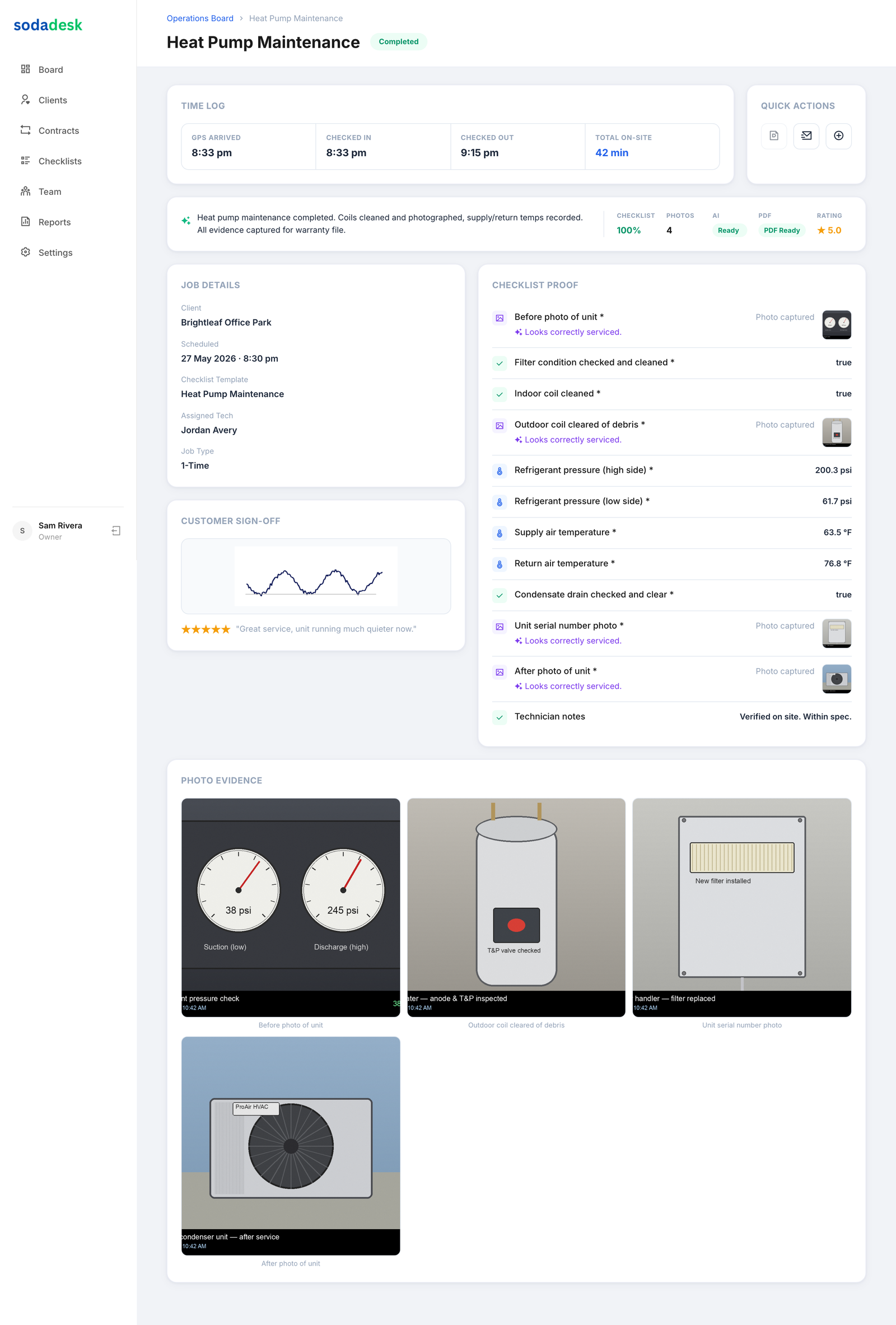
That’s where a good job record pulls its weight. It shows who got on site, when they got there, what they checked, what they touched, and what they left behind. If the customer says the unit was still short cycling, you’re not digging through old texts wondering who was there. You’ve got the time on site, the name of the tech, the checklist, the photos, and the numbers.
And with split systems, the numbers matter.
Start with a real check in
The first thing I want on any service call is proof the tech actually arrived. GPS check in does that. It stamps the time and location when the tech gets to the house, the strip mall, or the mechanical room. That matters when you’ve got a unit on a second floor, a long driveway, or a tech who likes to say he was there for two hours when the job sure didn’t take that long.
For a split system, I want the record to show the site, the start time, and who was on the call. If you run two or three trucks, that’s basic shop control. If you run ten or more, it keeps the day from turning into a memory contest.
A solid check in also sets the tone. The tech knows the visit is being recorded as work, not just a blur between stops. That changes how people handle the rest of the job.
Walk the indoor unit first
A proper split system visit usually starts indoors. The tech should look at the air handler or furnace, filter condition, blower compartment, evap coil access, condensate pan, and drain line. If the filter’s packed, that goes in the checklist. If the drain trap is slimed up, that goes in too. If the evap coil is dirty enough to choke airflow, take a photo before anything gets cleaned.
I like records that call out the specific parts. Not just “checked indoor unit.” Write down that the tech inspected the blower wheel, verified the float switch, flushed the drain, and checked the supply plenum for signs of rust or air leakage. If the blower door switch is loose or the belt is glazed on an older setup, that belongs in the record.
Here’s a simple example. A tech finds a frozen coil on a summer call. He shuts it down, checks filter condition, inspects the blower motor, and finds the ECM motor is pulling higher amps than normal because the wheel is loaded with dust. He photographs the wheel before cleaning, records the amp draw after startup, and notes the supply temp and return temp once the system stabilizes. That’s a real job record. You can see the work.
Record the outdoor side like you mean it
The condenser is where a lot of lazy service records fall apart. “Checked outdoor unit” tells me nothing. Did the tech clean the coil? Did he inspect the fan blade for wobble? Did he check the contactor, capacitor, and wiring? Was the disconnect in good shape? Was the pad settled? Those details matter because they tell you what kind of shape the system is really in.
For a split system, I want outdoor readings too. If the tech checks refrigerant pressures, note suction and discharge pressure. If he measures superheat and subcooling, record both. If he checks compressor amps, log the reading. If he measures outdoor ambient and coil condition, that belongs in the job file.
Take photos of the outdoor coil before and after cleaning. If a leaf pile was packed against the side of the condenser or the coil fins were bent over, show it. If a hard start kit was added, show the installed part and note it on the checklist. You’re not building a scrapbook. You’re building proof that the unit got the attention it needed.
Put the refrigerant story in the record
A split system can run okay and still be wrong. Low charge, overcharge, airflow issues, dirty coils, a restriction, or a weak compressor can all show up in the readings before the customer notices anything. That’s why the record should capture the numbers, not just the opinion.
If the tech checks the suction line temperature, liquid line temperature, and calculates superheat and subcooling, those numbers go in the job record. If the service port caps are replaced and tightened, note that too. If there’s a leak check with an electronic detector or bubbles at a fitting, the result should be written down plainly. No drama. Just facts.
And if the tech doesn’t touch refrigerant at all, that should be clear too. Sometimes the problem is airflow, a bad capacitor, or a failed condenser fan motor. A clean record tells the difference. That saves you from a customer assuming the system was “topped off” when all that happened was a dirty blower wheel got cleaned and the drain was cleared.
Don’t skip the thermostat and controls
The thermostat is where the customer notices the problem, so it should get attention in the record. Was it set to cool? Was the call for cooling present? Did the tech verify low voltage at the contactor? Did he find a bad transformer, a broken common, or a loose wire at the air handler board?
If the tech replaces a capacitor, contactor, thermostat, or float switch, photograph the old part and the installed part. Record the part numbers if your shop wants that level of detail. Even without getting into the parts closet, the record should show what failed and what got put back into service.
That’s useful on recurring visits too. If the same split system has a drain issue every spring, the notes should show the pattern. Maybe the unit needs a drain cleanout each visit because the line runs flat for six feet. Maybe the filter cabinet is letting dust bypass. A good record makes patterns obvious.
Use a checklist that matches the job
This is where a lot of shops get sloppy. They hand the tech a generic service sheet that doesn’t fit the actual work. A split system service checklist should have room for the indoor unit, outdoor unit, electrical checks, airflow checks, refrigerant readings, and the final condition of the system.
A good checklist for this kind of job usually includes:
- check in time and tech name
- filter condition
- blower compartment inspection
- evap coil inspection
- condensate pan and drain line
- thermostat operation
- contactor condition
- capacitor reading
- fan motor operation
- compressor amps
- suction and discharge pressure
- superheat and subcooling
- supply and return temperature
- after photo of cleaned parts or repaired area
- customer signature when the visit is complete
You don’t need a wall of paper. You need the right fields. The tech should be able to finish the form without fighting it, and you should be able to read it later without guessing what “checked system” meant.
Make recurring visits leave a trail
Split systems in homes, offices, and small commercial spaces often come back on a recurring schedule. Spring check, fall check, coil cleaning, filter service, drain flush, whatever the setup is. Those visits only make sense if each one builds on the last.
A recurring service record should show the previous visit date, who handled it, and what was found. If the tech notes that the condensate drain was slow in April, you want to know whether it was flushed in September. If the outdoor coil was caked with cottonwood last year, you want the after photos from this year to show it was cleaned again. That’s how you keep the story straight without standing over the truck all day.
The best part is simple. When a customer calls and says, “I thought this was serviced last month,” you can open the record and see the visit time, the tech, the checklist, and the photos. No guessing. No friendly debate with a bad memory.
Keep it honest when the job goes sideways
Not every split system visit ends with everything perfect. Sometimes the compressor is weak. Sometimes the evap coil is restricted. Sometimes the unit is so buried in grime that the tech has to come back after parts or after a proper cleaning setup. That should be in the record too.
If the tech found a failed dual run capacitor, he should write down the old reading and the new reading after replacement. If he found low airflow because the blower motor was failing, note the amp draw and the symptom. If the job needs another visit, the first record should make the next one easier, not harder.
That’s the real value here. You don’t need every tech carrying the whole job in his head. You need a clean trail of time on site, who did the work, what got checked, what got photographed, and what got left behind. That’s the difference between a service call you can stand behind and one you’re trying to piece together from memory after supper.
Common questions
What should a split system service record include?
It should show who was on site, the check in time, indoor and outdoor checks, refrigerant readings if they were taken, photos, checklist items, and the final condition of the unit.
Do I need photos on every split system visit?
Not every minute of the visit, but you do want before and after photos when the tech cleans a coil, replaces a part, finds damage, or fixes a visible problem. Photos settle arguments fast.
What readings matter most on a split system?
Suction and discharge pressure, superheat, subcooling, amp draw on the compressor and blower motor, and supply and return temperatures. Those readings show whether the system is moving air and refrigerant the way it should.
Why record GPS check in on service calls?
It gives you a time stamp and location for when the tech arrived. That cuts down on guesswork about site time and makes the job record harder to argue with later.